Best Stereo Widener Plugins (2026): The Ultimate Stereo Imaging Guide & Width VST Review
Discover how to achieve massive, radio-ready stereo width without losing punch in mono. Master Mid/Side processing, 4th-order Linkwitz-Riley bass mono crossover, phase correlation, and download Width—the #1 free stereo imaging plugin.
The Quest for Massive Stereo Width in Modern Music Production
Listen to any top-charting Billboard hit, festival EDM banger, or modern Hip-Hop production, and you will notice one defining characteristic: the mix feels immense, expansive, and three-dimensional. Synths wrap around your ears, vocal reverbs float into the ether, and percussion elements dance along the extreme stereo edges.
Yet, when amateur producers attempt to widen their tracks, disaster usually strikes. The kick drum loses its chest-thumping impact, the bass turns into a muddy phase swamp, and when the track is played on an iPhone speaker or mono Bluetooth speaker, entire instruments vanish.
How do world-class mixing and mastering engineers achieve breathtaking stereo depth while keeping their mixes rock-solid in mono? The answer lies in precision Mid/Side processing and low-frequency bass mono crossover filtering.
In this guide, we dive deep into the science of stereo imaging, break down why standard delay wideners fail, compare the top stereo widener plugins of 2026, and show you how to use Width by ProducerToy—the breakthrough 100% free stereo imaging plugin.
Looking for Studio-Grade Stereo Depth?
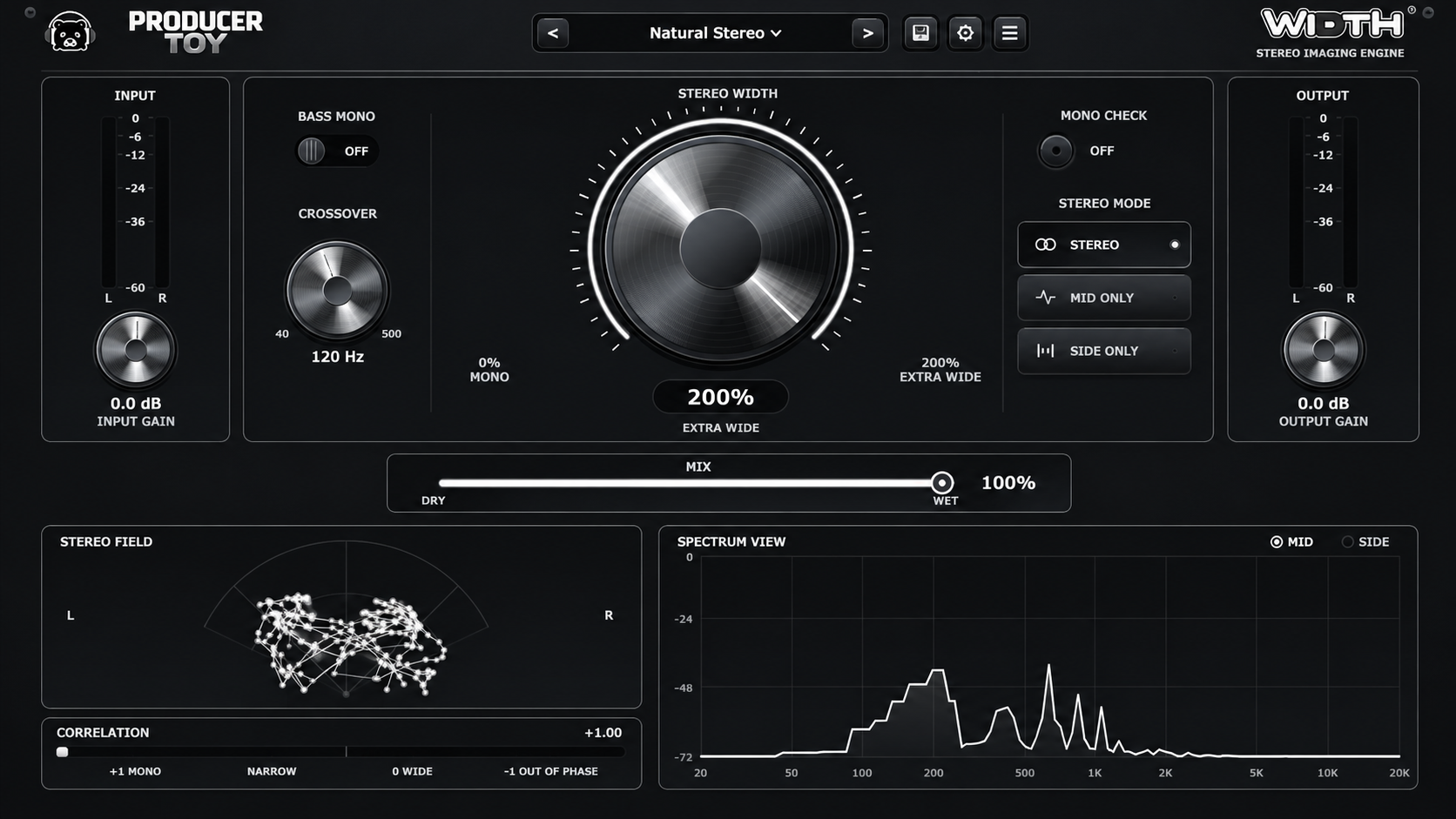
Get ProducerToy Width free—featuring continuous 0%–200% Mid/Side expansion, 4th-order Linkwitz-Riley Bass Mono crossover, 60 FPS polar vectorscope, and zero latency.
Download Width Free VST3 / AU →1. What Is Stereo Imaging in Music Production?
Stereo imaging is the spatial manipulation of audio across the two-channel (Left and Right) soundstage to create the perception of width, depth, and localization. While standard panning moves a sound left or right across the horizontal plane, a stereo widener plugin dynamically alters the relationship between the in-phase (Mid) and out-of-phase (Side) components of an audio signal.
The goal is to push atmospheric and harmonic elements outward toward the speaker boundaries while maintaining a focused, punchy phantom center for core elements like the lead vocal, kick drum, snare, and sub-bass.
2. Why Delay-Based Wideners Destroy Your Mono Mix
Many legacy widener plugins rely on the Haas Effect—delaying one channel by 10 to 30 milliseconds relative to the other. While this sounds wide in headphones, it introduces a severe physical phenomenon known as acoustic comb filtering.
- When both channels are combined into mono, identical waveforms arriving with slight phase delays collide, cancelling out specific frequencies at regular harmonic intervals.
- Vocals sound hollow and tinny, like speaking through a metal tube.
- Drums lose punch and transient snap.
- Sub-bass and 808s experience catastrophic phase cancellation, leaving your low-end weak and lifeless.
The Solution: Mathematical Mid/Side stereo encoding combined with steep frequency-dependent crossovers.
3. The Mathematics of True Mid/Side Stereo Processing
Instead of manipulating time delays, high-end mastering processors use a Mid/Side matrix to separate audio into two distinct mathematical components:
- Mid (M) = (Left + Right) × 0.5 — Represents everything common to both channels (the phantom center: lead vocal, kick, snare, bass).
- Side (S) = (Left - Right) × 0.5 — Represents the differences between channels (stereo width: ambient reverbs, wide synths, double-tracked guitars, stereo delays).
By independently scaling the Side channel relative to the Mid channel, you can adjust perceived width continuously:
- 0% Width: Side channel is completely muted. The signal collapses into pure, 100% phase-coherent mono.
- 100% Width: The original audio signal is untouched and bit-transparent to the source.
- 200% Width: The Side channel is boosted by a factor of 2.0x, pushing ambient information to the extreme outer perimeter of the stereo field.
4. The Secret Weapon: 4th-Order Linkwitz-Riley Bass Mono
The number one mistake producers make when applying stereo widening is allowing sub-bass frequencies to spread into the stereo field. Low frequencies carry massive acoustic energy; when out-of-phase low-end is played on club PA subwoofers or vinyl cuts, phase cancellation causes destructive physical cancellation.
ProducerToy Width solves this with an integrated 4th-Order Linkwitz-Riley Bass Mono Crossover:
- Selectable crossover frequency from 40 Hz to 500 Hz (optimal default at 120 Hz).
- Cascaded 2nd-order Butterworth filters ($Q = 0.7071$) applied specifically to the Side channel.
- Frequencies below the crossover are smoothly rolled off in the Side channel and collapsed into mono, while frequencies above the crossover retain full stereo expansion.
- The result: crystal-clear, centered low-end punch combined with expansive high-end width.
5. Real-Time Visual Telemetry: Reading Vectorscope & Correlation
Never mix stereo width with your ears alone; monitoring acoustics and room reflections can easily deceive you. ProducerToy Width includes a full hardware-accelerated 60 FPS telemetry suite:
1. Lissajous Polar Vectorscope (Goniometer)
Maps audio samples onto a 2D polar plane. A vertical line represents a pure mono signal; a circular or wide elliptical cloud indicates balanced stereo spread; a horizontal line warns of severe out-of-phase stereo content.
2. Phase Correlation Meter (-1.0 to +1.0)
Calculates the real-time Pearson correlation coefficient. A reading between +0.5 and +1.0 indicates a healthy, mono-compatible mix. A reading hovering near 0 indicates very wide stereo spread. Any drop below 0 into negative territory (-0.1 to -1.0) warns of immediate phase cancellation.
3. Dual-Mode FFT Spectrum Analyzer
A 2048-point Hann-windowed frequency analyzer allows you to independently isolate and visualize the frequency distribution of both the Mid and Side channels across the 20 Hz – 20 kHz spectrum.
Top Stereo Widener Plugins Comparison (2026 Benchmark)
Here is how ProducerToy Width compares against industry standard commercial and freeware stereo wideners:
| Plugin | Price | Architecture | Bass Mono Crossover | Vectorscope / Telemetry | Audition Modes | Latency |
|---|---|---|---|---|---|---|
| ProducerToy Width | FREE ($0) | True Mid/Side (0%–200%) | Yes (4th-Order Linkwitz-Riley) | 60 FPS Lissajous + Correlation | Stereo, Mid Only, Side Only | 0 Samples |
| iZotope Ozone Imager 2 | Free / Paid ($129) | Delay & Stereo Widening | Stereoize mode only | Polar Vectorscope | Stereo only | ~20 Samples |
| Polyverse Wider | Free ($0) | Comb Filtering Algorithm | No Bass Mono | None | Stereo only | 0 Samples |
| Waves S1 Stereo Imager | $29.99 | M/S Shuffler | Bass Trim only | Basic Vector Display | Stereo only | 0 Samples |
6. Step-by-Step Mixing Guide: Using Width in Your DAW
Scenario A: Modern Vocal Space
- Insert Width on your Vocal Bus or Reverb Return Aux track.
- Select the Vocal Space factory preset (Width set to ~135%).
- Enable Bass Mono and set the crossover to 180 Hz to prevent chesty vocal boom from spreading.
- Toggle Side Only to audition the ambient reverb and delay tail around the lead vocal.
- Hit Mono Check to verify that the lead vocal stays upfront and clear.
Scenario B: Expansive Synth Leads & Pads
- Place Width directly on your polyphonic synth or supersaw track.
- Dial Width to 160% – 180% for lush wall-of-sound depth.
- Set Bass Mono to 140 Hz to keep the fundamental notes centered.
- Inspect the Polar Vectorscope to ensure the Lissajous pattern forms an upright cloud without tilting sideways.
Scenario C: Drum Bus Air & Percussion
- Load Width on your Drum Room mics or Overhead bus.
- Apply subtle widening of 115% to 125%.
- Set Bass Mono to 160 Hz to ensure the snare body and kick drum bleed remain tightly centered.
- Enjoy pristine cymbal shimmer and room dimensionality without losing transient impact.
Scenario D: Mastering Mix Bus
- Place Width as the first spatial processor on your master chain before limiting.
- Select the Master Safe preset (Width ~112% to 118%).
- Engage Bass Mono with a 90 Hz crossover to guarantee sub-bass club compatibility.
- Check the Correlation Meter: ensure readings never dip below +0.3 throughout the song's loudest sections.
Frequently Asked Questions
Is ProducerToy Width really 100% free?
Yes. Width is completely free freeware with no subscriptions, ads, iLok dongles, or trial timeouts. You also receive a 100% royalty-free perpetual commercial license to use it in all your productions.
Does Width cause phase cancellation when summed to mono?
No. Because Width operates on a linear Mid/Side matrix rather than destructive time delays, summing to mono cancels only the Side expansion, restoring the pure original Mid signal without comb filtering.
Which DAWs are compatible with Width?
Width is fully compatible with FL Studio, Ableton Live, Logic Pro, Pro Tools, Cubase, Studio One, Reaper, and Bitwig across Windows 10/11 and macOS (native Apple Silicon and Intel).
Can I use Width during recording and live performance?
Yes. Width features true zero latency (0 samples) and zero memory allocations in the audio thread, ensuring peak stability with minimal CPU usage.
Upgrade Your Stereo Soundstage Today
Download ProducerToy Width now and take full command over the spatial depth and punch of your music.
Download Width Free Now →
Naiem Shaikh
AuthorFounder & Lead Audio Engineer at Producer Toy. Dedicated to empowering music producers worldwide with cutting-edge VSTs, pristine soundware, and battle-tested studio workflows.
Related Articles
View all →
October 29, 2026
Best Reverb Plugins (2026): The Ultimate Reverb VST Guide & ProVerb Review
Discover the best reverb plugins in 2026. Master algorithmic vs convolution reverb, fix mix mud with smart ducking, and explore ProVerb—the #1 free AI reverb VST.

October 27, 2026
How Hyperlift Works: The Complete Audio Transition & Riser Engine Guide (2026)
Learn how Hyperlift works under the hood. Master multi-band risers, tempo-locked pitch automation, white noise sweeps, and tension-building transitions for your drops.

October 27, 2026
How Much Does Zenology Cost? Roland Zenology Pricing & Review (2026)
Wondering how much Roland Zenology costs? Compare Zenology Lite (Free), Zenology Pro Lifetime Key ($229), and Roland Cloud Subscriptions (Core vs Pro).