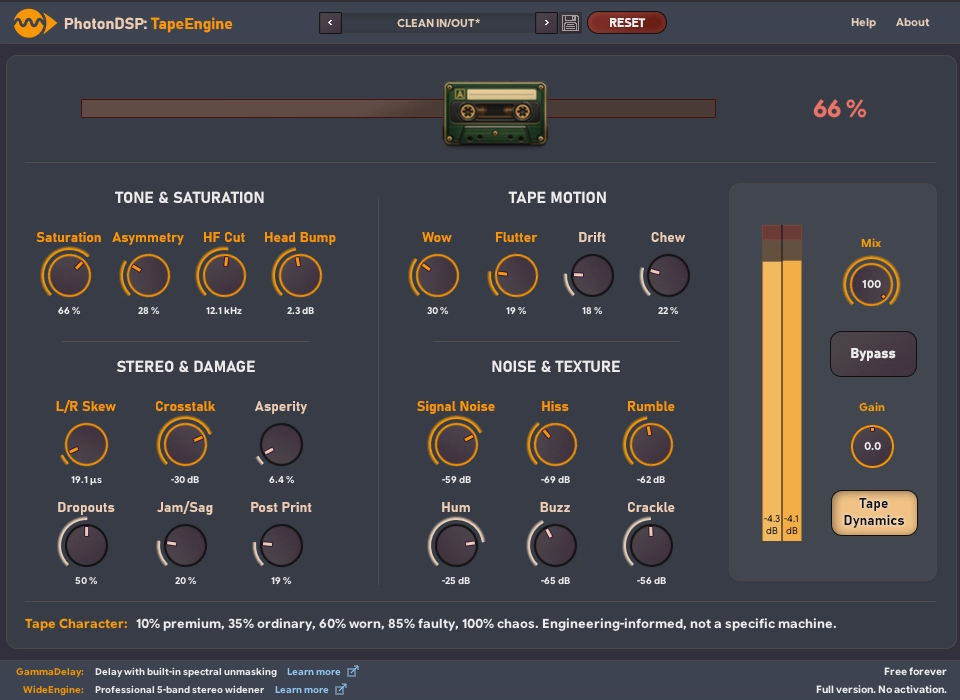
PhotonDSP TapeEngine Free Tape Emulation VST for Windows – 100% Free
PhotonDSP launches TapeEngine, a fully featured tape‑emulation plugin for Windows that’s completely free – perfect for producers seeking analog warmth without spending a dime.
Overview
PhotonDSP has just released TapeEngine, a free tape‑emulation VST for Windows. Despite its zero‑price tag, the plugin packs twenty individually adjustable processing modules, giving users a surprisingly deep level of control over tape saturation, bias, wow & flutter, and more.
DSP Architecture & Processing Modules
TapeEngine models a classic analog tape machine using a modular DSP chain. Users can enable and tweak each of the following modules:
- Input Saturation – soft‑clip and harmonic enrichment before the tape path.
- Bias Control – adjusts the high‑frequency response, emulating tape bias settings.
- Tape Speed Selector – 15 ips, 30 ips, and custom speeds for tonal variation.
- Wow & Flutter – granular modulation of pitch to recreate tape wobble.
- Head Alignment – simulates mis‑aligned heads for subtle phase quirks.
- Noise & Hiss – adds realistic tape hiss with adjustable density.
- EQ Section – low‑mid and high‑mid shelving to shape the tape’s tonal curve.
- Output Compression – optional gentle compression to emulate tape’s natural limiting.
- Multiple Tape Types – selectable emulations of ferric, chrome, and metal tapes.
- Custom Routing – reorder modules to craft unique signal paths.
Each module features its own knob, toggle, and visual meter, allowing producers to sculpt the tape character from subtle warmth to aggressive distortion.
Sound Character & Practical Use Cases
TapeEngine excels at adding analog glue to drums, fattening synth pads, and imparting vintage grit to vocal tracks. Because the processing is fully non‑destructive, you can insert it on any track or bus in your DAW and automate parameters in real time. The depth of control makes it suitable for both quick “one‑click” tape warmth and detailed sound‑design projects.
Installation & DAW Compatibility
- Platform: Windows 10 / 11 (64‑bit only)
- Formats: VST2 & VST3
- DAWs Tested: Ableton Live, FL Studio, Studio One, REAPER, and Cubase.
Installation is straightforward: download the installer, run it, and the plugin will appear in your VST folder. No activation key is required.
Final Thoughts
While it may not replace high‑end commercial tape emulators like ChowTape, TapeEngine offers a level of customization rarely seen in free plugins. For producers on a budget or anyone looking to experiment with tape processing without a financial commitment, this is a must‑have addition to your plugin arsenal.
Related Stories
.webp)

© 2026 Producer Toy Editorial & respective rights holders. All brand names, logos, and product trademarks are the property of their respective developers.